State Management
repoman can save a snapshot of all your third-party repositories to a .repoman file
and restore it later — on the same machine, after a reinstall, or on a completely
different machine running a different Ubuntu release.
Saving state
Open Repos → Save state…
repoman writes a .repoman file containing every third-party repository's URI,
suite, components, enabled state, signing key path, and (if the key file is readable)
the key bytes embedded as base64. The file is self-contained — no sidecars or archives.
The default filename is state-YYYY-MM-DD.repoman. You can save anywhere, including a
USB drive or a shared folder.
Loading state
Open Repos → Load state… and select a .repoman file.
repoman compares the saved entries against the repositories currently on the system, matching by primary URI.
Same-machine restore (fast path)
If the saved file came from the current machine (or any machine running the same Ubuntu release), repoman applies the enabled/disabled states of matched repositories in a single polkit operation. No network checks are performed.
If any repositories from the file are not found on the system, the missing repositories dialog appears.
Cross-machine restore
When the file was saved on a machine running a different Ubuntu release, repoman detects the mismatch and opens a 3-page restore wizard:
| Repository type | Action |
|---|---|
Suite-agnostic (e.g. stable, main, focal-security) |
Restored unchanged — these work on any release |
| PPA | Availability checked against the current codename via Launchpad |
| Third-party with older or same-era codename | Suite updated to the current codename |
| Third-party with newer codename than current | Added as disabled — can't use a future-release repo on an older OS |
Page 1 — Review restore plan
All repositories are listed, grouped by what will happen to them:
- Updating suite to
{codename}— non-PPA repos whose suite will be updated - Checking against Launchpad — PPAs that need a live availability check
- Adding as disabled — repos not usable on the current release
- Restoring unchanged — suite-agnostic repos
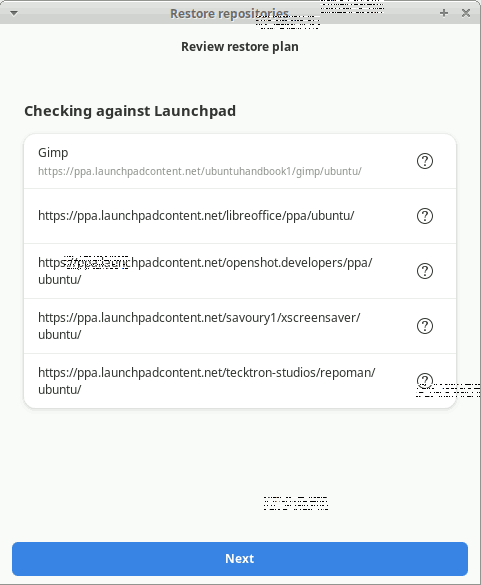
Click Next to proceed.
Page 2 — Checking PPAs (only shown when PPAs are present)
Each PPA is checked against Launchpad for the current codename. A spinner appears per row and is replaced by an icon as each result arrives. The Next button unlocks once all checks are complete.
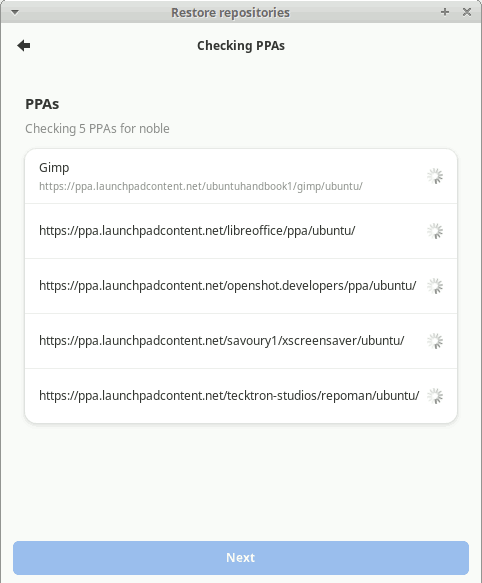
Page 3 — Confirm restore
A final grouped summary shows all changes. An administrator password prompt is shown if anything will be written. Click Apply changes to proceed or close the wizard to cancel with no changes written.
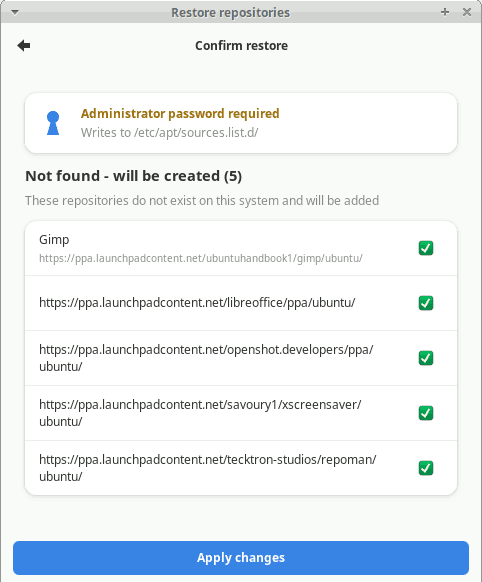
One polkit prompt covers all matched-repo changes. After applying, any repositories not found on the system proceed to the missing repositories dialog.
Missing repositories dialog
When saved repositories are not found on the current system (by URI), repoman offers three choices:
- Skip — ignore the missing repositories entirely
- Add N enabled — create only the repos that were enabled when saved
- Add all N — create all missing repositories (disabled ones added as disabled)
If the .repoman file was saved with GPG key content embedded, the keys are written
to their original paths automatically as part of the same polkit operation — no manual
key installation needed. Only repos saved without embedded key content will show a
"you may need to install these keys manually" warning.
File format
.repoman files are plain JSON (version 2):
{
  "version": 2,
  "saved_at": "2026-07-08T14:22:00",
  "saved_codename": "noble",
  "repos": [
    {
      "types": ["deb"],
      "uris": ["https://packages.example.com/ubuntu"],
      "suites": ["noble"],
      "components": ["main"],
      "enabled": true,
      "description": "Example Project",
      "signed_by": "/usr/share/keyrings/example.gpg",
      "signed_by_content_b64": "<base64-encoded key bytes>",
      "architectures": [],
      "source_file": "/etc/apt/sources.list.d/example.sources"
    }
  ]
}
Version 1 files (no saved_codename, no signed_by_content_b64) are still loaded —
they use the same-machine fast path and show the manual key warning for any repo with
a signed_by path.