Annotations
The problem with unnamed repositories
An APT sources file looks like this out of the box:
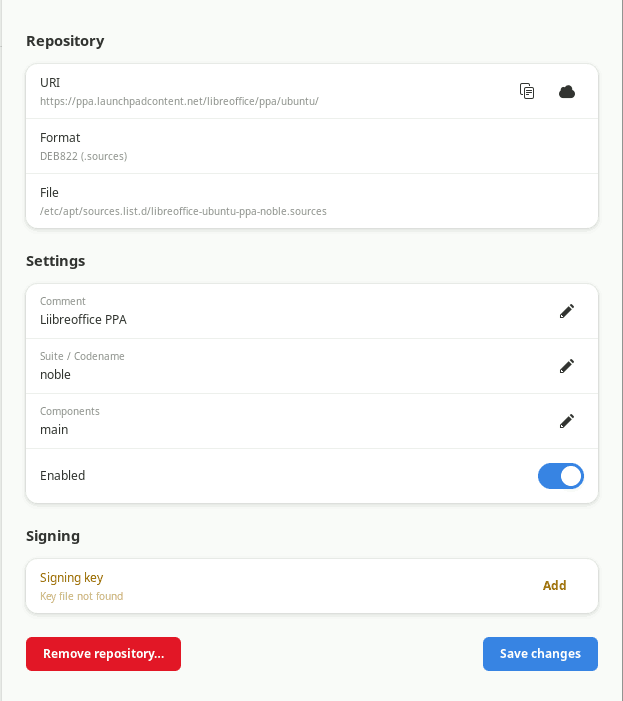
There's no human-readable name. In the repoman sidebar, this repository shows up as packages.example.com — which tells you where it came from, but not what it's for.
After an upgrade, Ubuntu strips any comments you may have added to .list files and replaces the codename. A year later, staring at fifteen URIs you don't recognize, deciding which ones to re-enable becomes a guessing game.
Adding a description
Select a repository in the sidebar. Click the Name / Description field in the detail pane and type anything — "Gimp PPA", "Docker CE", "work laptop dev tools". Click Save.
repoman writes the description as an X-Repolib-Name: field directly in the .sources file:
Types: deb
URIs: https://packages.example.com/ubuntu
Suites: noble
Components: main
Enabled: yes
X-Repolib-Name: Example Project
This field survives Ubuntu upgrades — the upgrade process modifies Suites: and Enabled: but leaves other fields alone. The name is there the next time you open repoman, and the next, and the one after that.
How repoman reads names
When loading a repository, repoman looks for a name in this order:
X-Repolib-Name:field (software-properties-gtk convention)Description:field- A
#commentline immediately before the stanza (repolib convention)
If none of these are present, the display name falls back to the first URI.
Legacy .list format
.list files don't support named fields — they're a single line per repository. If you open a .list repository in repoman, set a description, and save, repoman converts the file to DEB822 .sources format automatically. The old .list file is deleted and the new .sources file is written in one polkit operation.
The description is stored as X-Repolib-Name: in the new file and will be preserved from that point forward.
Note
Conversion only happens when you save a change to the repository. Simply opening a .list file in the detail pane does not convert it.